
Introduction to Python – Useful Codes
from Bioinformatics Training at the Harvard Chan Bioinformatics Core
*In Python syntax, indentation is very important.
*Within a line of code, Python is lenient about whether to use spaces or not. Using space could help readability, but is a personal preference.
Terminology:
Variable : a temporary container that stores certain information.
(use “=” operator to assign some value to a variable)
Rules when naming a variable in Python:
– Must start with a letter or underscore character.
– Can only contain alpha-numeric characters or the underscore character (A-z, 0-9, _)
– Cannot be a reserved keywords in Python. Complete list can be found here.
– Is case-sensitive (e.g. Month and month are two different variable names)
#Assign two variables: 2 to x, and 5 to y
x = 2
y = 5
# Print out the value of variables ‘x’ and ‘y’; you can use print( ) function
print(x)
print(y)
x
y
New variables can be generated by performing some mathematical calculations on existing variables.
# Calculate the difference of x and y and store the value to a variable called ‘diff’
diff = x – y
# Calculate the mean of x and y, and store the value to a variable called ‘mean’
mean = (x + y)/2
Other examples: power (**), square root (sqrt( )).
Data Types
– int (whole number; integer / e.g. variable x)
– float (a number with decimal places / e.g. mean)
– str (string; stores a sequence of characters, and can be created by enclosing characters inside single quotation marks ‘ ‘ or double quotation marks ” “.
– bool (boolean; used to specify if an expression is either True or False)
*These are similar to the “integer”, “numeric”, “character”, and “logical” data types in R.
type( ) function can be used to check with data type a given variable has.
type(x) -> int
type(mean) -> float
# Generate a str variable called ‘text’, with the value ‘hello world!’. Check its data type
text = ‘hello world’
type (text) -> str
=> Could also use str() when you need to convert something that isn’t already a string:
e.g.
number = 42
text = str(number) #converts integer to string “42”
# Generate a boolean variable called ‘test’, which judges whether 10 is smaller than 8. Check its data type.
test = 10>8
print(test) -> False
type(test) -> bool
Python Data Structures
In Python, data is stored in specific ways within variables.
– List : a Python list is a collection of data stored within a square bracket [ ].
A list has the following features:
– Order of its elements matters.
– Can store mixed data types that we introduced above.
– Can contain a sublist.
Example of List Objects:
list.append
list.extend
list.insert
list.remove
list.pop
list.clear
list.index
list.count
list.sort
list.reverse
list.copy
# Create an empty list called ’empty’
empty = [ ]
print(empty) -> [ ]
print(type(empty)) -> <class ‘list>
# Create an empty list called ‘species’ containing three strings: ecoli, human, corn.
species = [‘ecoli’, ‘human’, ‘corn’]
# Create a list called ‘glengths’, containing three numeric values that correponds to genome length (in Mb): 4.6, 3000, 2500
glengths = [4.6, 3000, 2500]
type (glengths) -> list
# Create a list called ‘combined’, containing all three species and corresponding genome lengths as pairs.
combined = [[“ecoli”, 4.6], [“human”, 3000], [“corn”, 2500]]
# Create a list called ‘combined2’, with each species and genome length pair as a sublist.
combined2 = [[“ecoli”, 4.6], [“human”, 3000], [“corn”, 2500]]
[Subsetting a Single Element from a List]
Accessing the data within a list; we can do this by specifying the ‘index’ number (the location of the data within the list).
***Python index starts from 0!!
Thus, first element of a list is: list [0]
The last element of a list is: list[-1]
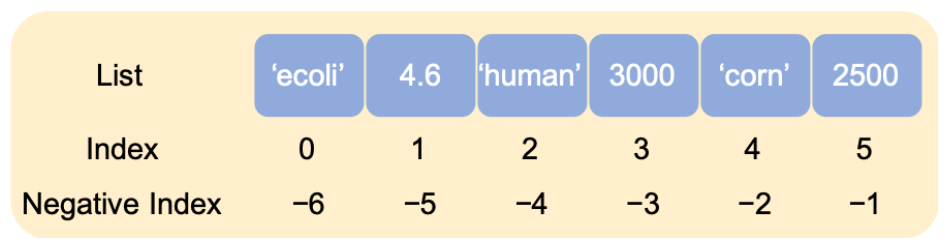
# Get the 3rd element from list ‘combined’.
combined = [[“ecoli”, 4.6], [“human”, 3000], [“corn”, 2500]]
combined [2]
-> [‘corn’, 2500]
# Get the 3rd from the last element from list ‘combined’.
combined = [[“ecoli”, 4.6], [“human”, 3000], [“corn”, 2500]]
combined[-3]
-> [‘ecoli’, 4.6]
[Subsetting Multiple Elements from a List]
*Slicing operator :
*The syntax of ‘slicing’ is [start:stop:step]
– Start is the starting index of the slice.
– Stop refers to the index of the first element just after the finish of ‘slice’.
– Step refers to step value of the slice.
If not specified, by default, Python will start from the first element, stop at the last element, and use step of 1.
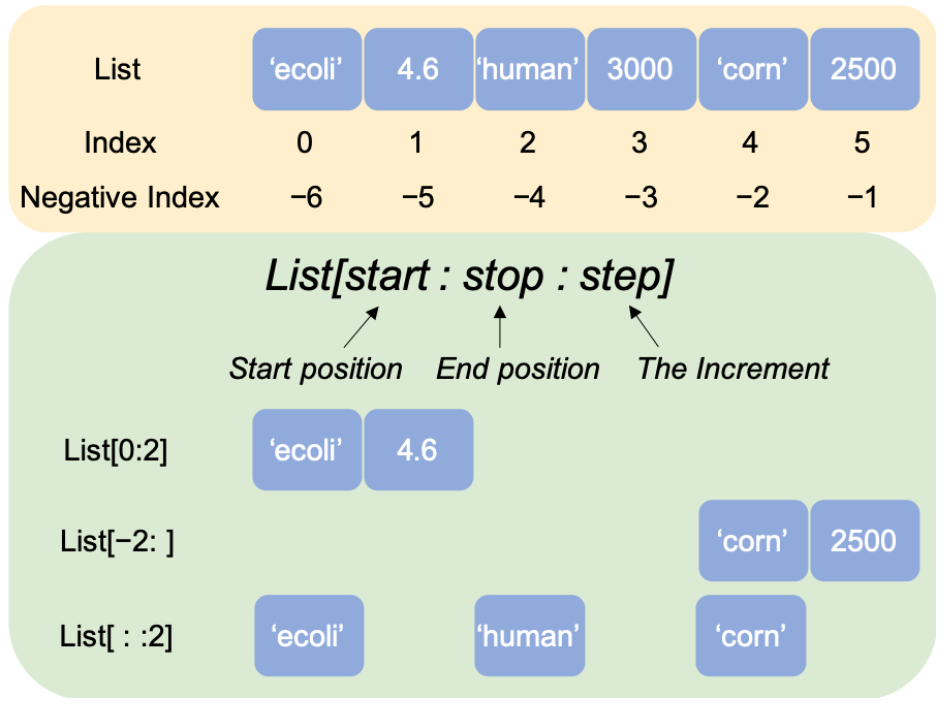
# Get the first two elements from the list ‘combined’ – method 1: specify both start and stop position.
combined[0:2] -> [‘ecoli’, 4.6]
# Get the first two elements from the list ‘combined’ – method 2: specify only stop position.
combined[:2] -> [‘ecoli’, 4.6]
# Get the last two elements from the list ‘combined’ – method 1: use normal index.
combined[4:] -> [‘corn’, 2500]
# Get the last two elements from the list ‘combined’ – method 2: use negative index.
combined[-2:] -> [‘corn’, 2500]
# Get every other element from the list ‘combined’.
combined[::2] -> [‘ecoli’, ‘human’, ‘corn’]
combined[1::2] -> [4.6, 3000, 2500]
[Using Lists as Stacks] Reference Website Link
A stack is where the last element added is the first element retrieved (“last-in, first-out”)
>> append ( ) ; to add item to the top of the stack.
>> pop ( ); to retrieve an item from the top of the stack.
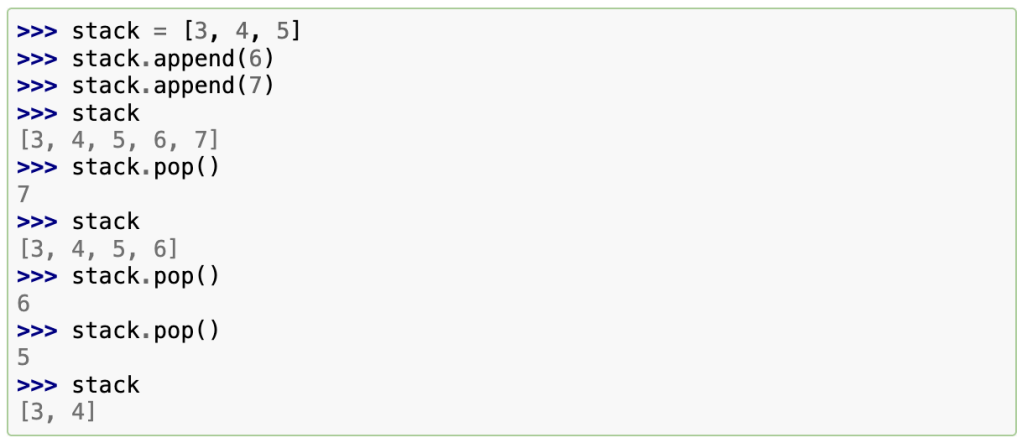
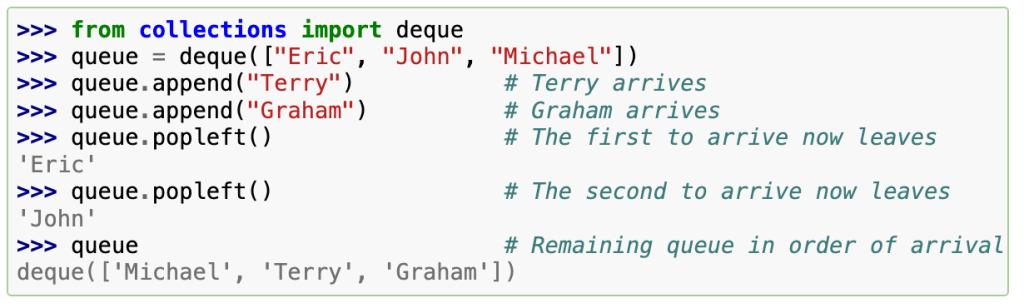
*It is important to note that list appends and pops from the end of the list, so doing inserts or pops from the beginning of a list is slow since all of the other elements have to be shifted by one.
Therefore, collections.deque is used since it fast appends and pops from both ends.
– Tuple : is a built-in collection used to store an ordered, unchangeable (immutable) sequence of items. In other words, a tuple consists of a number of values separated by commas. Python syntax uses parentheses e.g. (1, 2, 3)
*Python’s mutable objects, such as lists and dictionaries, allow you to change their value or data directly without affecting their identity. In contrast, immutable objects, like tuples and strings, don’t allow in-place modifications. Instead, you’ll need to create new objects of the same type with different values.
Tuples may seem similar to lists, but they are used in different situations for different purposes. Turples are immutable, and usually contain a heterogenous sequence of elements that are accessed via unpacking or indexing.
Lists are mutable, and their elements are usually homogeneous and are accessed by iterating over the list.
– Sets : is an unordered collection with no duplicate elements.
Curly braces { } or the set ( ) function can be used to create sets. To create an empty set, you have to use set ( ), not { }; the latter creates an empty dictionary.
Basic uses : membership testing (to quickly check if a given value is or isn’t part of a collection of values) and eliminating duplicate entries.
e.g.
>> basket = {‘apple’, ‘orange’, ‘apple’, ‘pear’, ‘orange’, ‘banana’}
>> print(basket)
-> {‘orange’, ‘banana’, ‘pear’, ‘apple’} #duplicates have been removed.
>> orange’ in basket #fast membership testing
-> True
>> ‘grape’ in basket
-> False
a = set(‘abracadabra’)
b = set(‘alacazam’)
>> a
-> {‘a’, ‘r’, ‘b’, ‘c’, ‘d’} #unique letters in a
>> a – b
-> {‘r’, ‘d’, ‘b’} #letters in a but not in b
>> a | b
-> {‘a’, ‘c’, ‘r’, ‘d’, ‘b’, ‘m’, ‘z’, ‘l’} #letters in a or b or both
>> a & b
-> {‘a’, ‘c’} #letters in both a and b
>> a ^ b
-> {‘r’, ‘d’, ‘b’, ‘m’, ‘z’, ‘l’} #letters in a or b but not both
– Dictionary : A set of key (value pairs, with the requirement that the keys are unique within one dictionary). A pair of braces creates an empty dictionary { }.
Unlike sequences, which are indexed by a range of numbers, dictionaries are indexed by keys, which can be any immutable type, such as strings and numbers.
Thus, tuples can be used as keys if they contain only strings, numbers, or tuples.
You can’t use lists as keys.
In simple terms, The set is a dictionary without values. Before sets, it was common to use dicts with empty values to get the same properties.
[Functions – Python has a set of built-in functions]
Different types of functions
– Built-in
– Object-specific
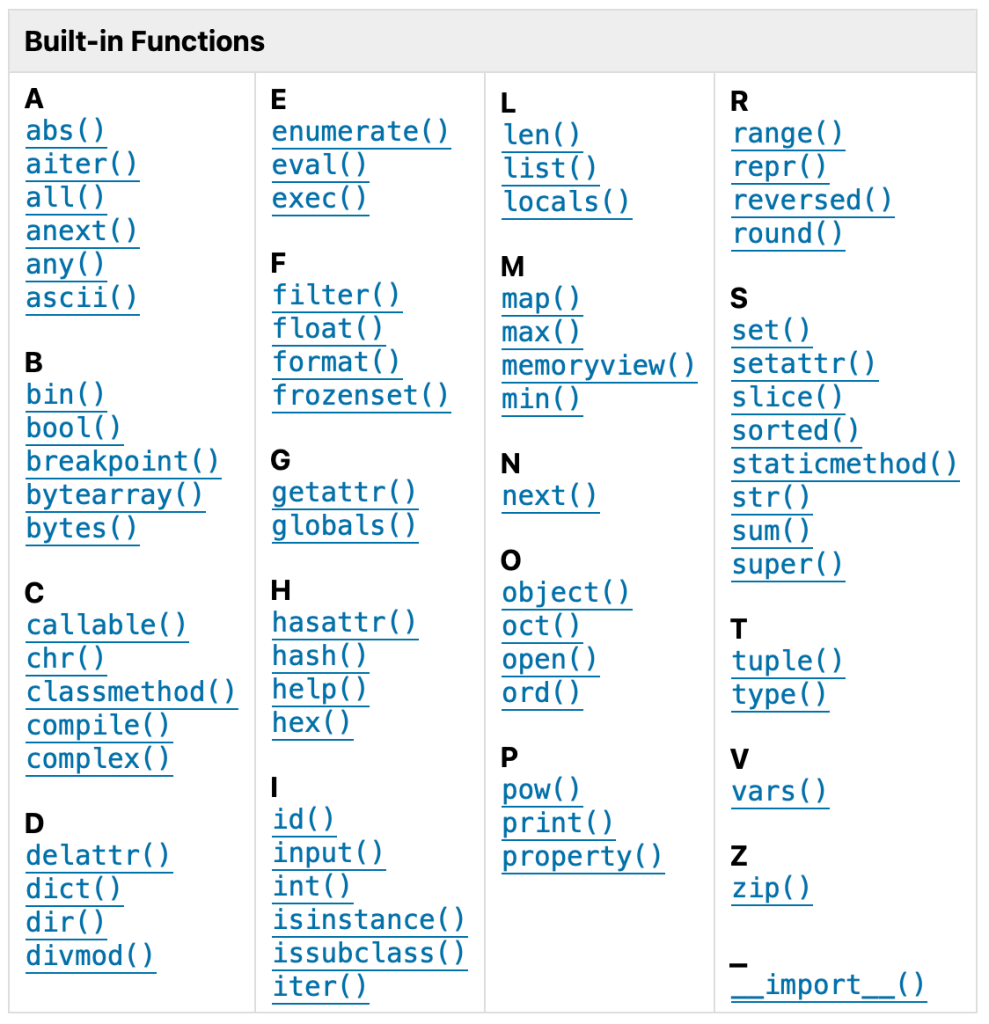
E.g.
# Use the max() function to return maximum value of the list ‘glengths’.
glengths = [4.6, 3000, 2500]
max(glengths) -> 3000
# Define a variable with the value of pi, and then output the corresponding whole number using the round() function.
pi = 3.131592
round(pi) -> 3
To check available arguments and usage information for a function, use help( ) function.
# Sort the glengths list in descending order. sorted ( ) function sorts the elements of a given list in a specific order.
glengths = [4.6, 3000, 2500]
sorted(glengths , reverse = True) -> [3000, 2500, 4.6]
[Object-specific Function]
Depending on the object type, there are functions to perform object-specific tasks.
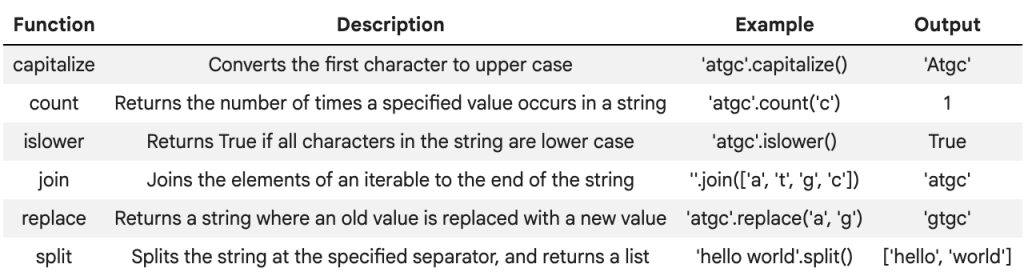
E.g. a function for a Python string is count.
count searches the substring in the given string and returns how many times the substring is present within the object. The syntax is string.count(substring).
# Count number of T in a DNA sequence ‘ACTGAT’
dna = ‘ACTGAT’
dna.count(‘T’) -> 2
Other functions for strings in Python:
[Packages]
A python package contains a collection of pre-defined scripts for specific tasks. It allows us to directly use these scripts to accomplish a task of interest, without having to write everything from scratch.
We need to install a Python package if it is not already present.
pip is the package installer for Python. install a package, we could use !pip install package_name command. For example, to install scanpy, a popular package for single-cell RNAseq analysis, we could use !pip install scanpy.
# error when using numpy package without importing first.
numpy.array([2, 3, 4, 5]) + numpy.array([1, 10, 100, 1000])
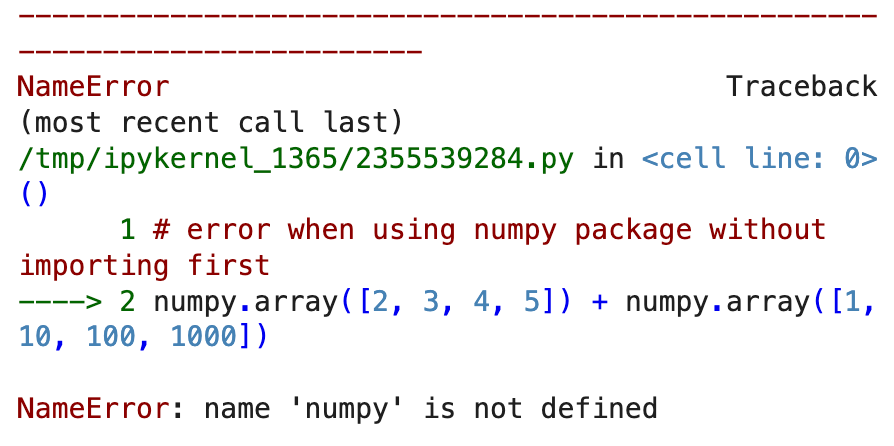
We need to therefore install the packages & import a package before using it.
Sometimes, we name an alias for a package, using the import package_name as alias syntax. This way, we just need to use the alias when citing a function from the package, which is convenient if we use the package often. For some popular packages, people set some conventions on what alias to use.
# import numpy library, and name it as np
import numpy as np
# use numpy package after importing (note: you need to use “np”, instead of “numpy”, because np is the alias we set earlier)
import numpy as np
np.array([2, 3, 4, 5]) + np.array([1, 10, 100, 1000])
-> array([ 3, 13, 104, 1005])
[Data Wrangling]
This is a process where we organise, clean, and subset data to what we need for downstream analysis. In Python, pandas is a powerful package to perform data wrangling.

